Pretty Good Hat

New Fitbit Dashboard

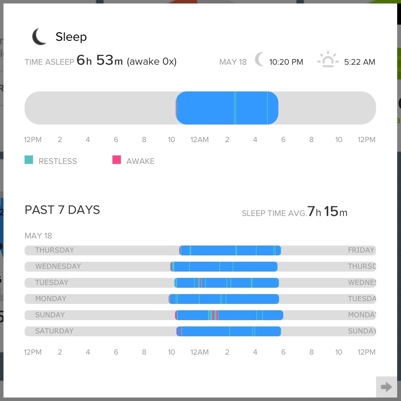
The fitbit folks have improved their dashboard quite a bit. The new display has moveable tiles and is pretty nice, but the most substantial improvement is that the data displays don’t require Flash any longer. Finally, that information is usable on iOS.

And they revamped their sleep record to be much more useful:
{:id: .center}

Looks familiar!

Integrating Runkeeper with Day One via Slogger

(Updated March 23, 2014)

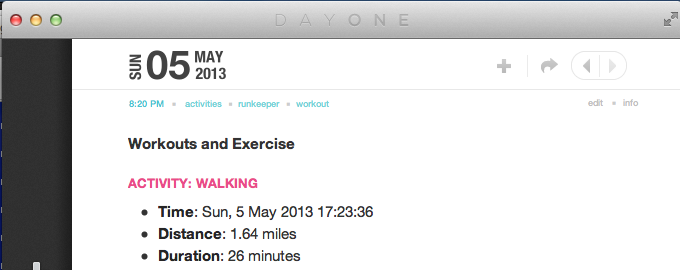
An annual exercise challenge rolled around again at my workplace, so naturally I found a project in it: Wondering if I could hook Runkeeper up to my Day One journal. The result: The Runkeeper plugin for Slogger

Getting up and running with the Runkeeper API was tricky; I never quite got the hang of passing parameters to it, which still puzzles me. When I figured it out, I put together a quick walkthrough for the API startup and posted it as a gist (Also embedded at the bottom of the post). The gist provides some instructions, but users new to Slogger plugins and working with API authentication may also want to check out Sven’s writeup that uses this method and includes a couple of additional screenshots.1
{:id: .center}

One note about configuring your Runkeeper application: The Runkeeper folks don’t want to appear to endorse any applications or have them potentially be confused for official Runkeeper services, so avoid identifying your app with anything that uses “Runkeeper” or “Health Graph” in its name or description to save yourself from receiving a polite email requesting you to make a change.

I built the Runkeeper plugin for Slogger with a fun option to save its data additionally to a text file. I plan to do some stats or plots or something with that data, perhaps akin to my fitbit visualization, one of these days.

Enjoy!


  1. Note that per this long thread it’s still not always straightforward to figure out the last step in the API setup. ↩︎

Another user for mover.io: Slogger on a server

I know I’m going on and on, but I’m enthused. I use Slogger to save entries from twitter, last.fm, app.net and fitbit activity to Day One. Just as with the build tool for my blog here, mover.io helps remove the laptop from the workflow. See, I don’t have have a dedicated old machine to run as a server for my Mac stuff, so the standard method of running slogger via a daily scheduled task doesn’t work so well for me. I set a reminder.

[Jim Ray on Twitter Music](http://jimray.tumblr.com/post/48626134951/twitters-music-app-is-beautiful-in-that)

The #NowPlaying pane gets to the heart of what’s really wrong with the app and, may I suggest, Twitter circa 2013. In order for this 25% of the app to be useful, the people I trust and follow must also auto-tweet what they’re listening to, complete with hashtag detritus (or trolls). Perhaps I’m just too far past what Twitter considers cool, but a stream littered with #NowPlaying refuse (or Vines or Foursqure check-ins, for that matter) is a sign that I need to spend some quality time with the unfollow button. Twitter has built an app that requires users to abuse their timelines and followers with machine tags without any meaningful way of tuning out that noise.

I use Rdio and I think they’ve got social done pretty well — it’s external to existing social networks but easily connects to them, so I can choose to engage with it when I want and otherwise keep it out of the way. (So it’s interesting/odd that Rdio now also hooks to Twitter Music.)

Using mover.io

It was a lot of fun to port my static blog workflow to a server-based build tool that relies on the mover.io API. Since then I’ve been tinkering with more general-purpose tools to play with mover. As an exercise, I put together a ruby-based widget I could use at the command line to simply finding and getting things from a connector attached to my mover.io account.

The gist is embedded below. This is intended for command line use; the script I’ve integrated with my blog build tool uses many of these mechanics but does a bit more work to diff the remote (Dropbox) directory with the local one and then cycle through downloads of the new files to my server, where the builder can do its business and publish to my dev and then public web locations. I’ll post the rest of that as soon as the code is a little bit less embarrassing.

The possibilities posed by this kind of integration are really cool, and I’ve had lots of fun developing this capability so far.

Hour-long meetings have a lot of filler

MG Siegler Recommends 30-minutes:

30-minute meetings are so much sweeter. As long as you make the length clear at the beginning of the meeting, I find that everyone (again, myself included) gets right to the point and cuts out a lot of the filler and padding that makes up a ridiculous amount of every conversation.

I know that may sound a bit crass. But pay attention to the next conversation you have — how much of it is filled with things that really don’t need to be said? A lot.

My workplace is a pretty meeting-heavy one, too, and also very social, but I’ve gotten better at getting through meetings without using the calendar-application-default of an hour. Shared expectations are key, and so is an agenda, so that all participants can see exactly when the conversation is done.