I really like this piece by Graham Smith at Jank: “Tinkering with games is as good as playing them”. Having spent so many hours working on my own Destiny 2-related data and stats tools, there is something very resonant in the notion that the computer is not just the vehicle for playing the game, but for doing things about the game:
I’m defining tinkering broadly here as anything that involves reaching beneath your computer’s glossy façade. The machine, which may be in front of you right now, is pretending that it is a tool of simple productivity, an obelisk of user-friendly efficiency. It is not. Your computer is 8000 rats in a burlap sack. To tinker is to reach inside the bag, remove a rat, and make friends with it.
If you’ve ever spent several weeks trying to build the perfect collection of Skyrim mods only to then not follow through with playing the game, you might be a tinkerer, too. Perhaps you’ve spent several hours curating your Steam Wishlist, sorting your library into categories, and selecting the perfect bootup video for your Steam Deck, and now you still spend more time browsing your game collection than actually playing it. Don’t feel bad! You, too, are a tinkerer.
My tinker-to-play ratio is pretty high, and tinkering has been one of the ways for me to learn a bunch of my current skills quite deeply. I think affinity for the tinkering is also one reason I’m just not attracted to the AI-enabled shortcuts to the product. I don’t want to simply have made a thing; I want to work through the making of the thing.
- I used Zed for a lot of my migration work. Its remote editing via an ssh connection works beautifully (and in fact is how I’m writing this post).
- Caddy is great! The way it enables automatic certificate installation is so seamless.
- I post with a Drafts action and a cross-platform shortcut for uploading images, both of which hit a little PHP micropub endpoint. It’s really pretty cool that with updates of authentication, I could move my posting tools over to a new host and just … keep using them.
- web sites and servers are cool and fun to play with
-
If you happen to want to plink around with some new servers of your own, follow the Hetzner signup link in Adam’s IRC guide; you’ll get a credit and he’ll get one, too, if you stick around! ↩︎
-
That’s “live” web site time; I just realized that if I go back to college archives, I’m at more than thirty years. Which. Well. ↩︎
Boring website administrivia
It’s been a couple of nice hobby web site weekends here are Pretty Good Hat PNW. Reading Adam’s great writeup of setting up an IRC server put me in the mood to play around with servers, and with the price of my shared hosting having gone up last year, I thought I’d experiment with setting up some servers at Hetzner.
Well, one good thing led to another, and curling was on TV so I had a lot of good laptop time, and so I’m finishing out this weekend having completely migrated from my prior host after more than ten years there. I learned a bunch about setting up new servers! I can’t say enough good things about Adam’s guide and the encouragement to be found hanging around the omg.lol community.1
Before cancelling my old service, I made an exhaustive scroll through all the content in that home directory, downloading and archiving a lot. Over the years I’ve had everything from twenty years of web sites2, to old versions of my CV, to little R experiments, ruby projects, and other things that kind of scaffolded a lot of my history. It really is true that a good chunk of the story of my life is the story of all the things I’ve done with web sites in that time. It’s a very specific kind of time capsule, those directories full of web projects, jpegs, and datestamps.
misc tools & process notes
Sometimes one does get the urge to change web hosts and screw around with servers for a couple of weekends.

After briefly operating again, authentication to the Peloton API has been re-restricted. There are apparently some workarounds, but building a bunch of OAuth mechanics on top of a non-public API is a lot of work on something too fragile for me to rely on. That means that RideShare is inoperable for the foreseeable future, and that’s a big bummer!
Much, but not all of the ride data continues to be available through Apple Health, so I can continue to use a lot of what I did to summarize the year’s exercise data last year. Here’s a quick comparison of workout intensity in 2025 and 2024.
Today’s hobby project troubleshooting: Darn, which library did I update in that other project (don’t renv me right now, I’m riffing) that’s causing this to fail? Okay, update some other libraries. Okay, maybe there’s new R version conflict; update R. Now reinstall all libraries. Hmm. Okay, rewrite to go around the place where I think the error is raised. Nope, but that isolated enough that I can see the problem. Fixed in one minute.
I’m continuing to use Helix and I really appreciated this quick overview from Felix Knorr, who provides a few new nice configuration options (including binding the immediate favorite gw command to a single key). I remain really happy with how ready-to-go this editor is without plugins or heavy-duty configuration, while still being discoverable and offering a lot of depth.


This feature of [Helix] is so good! Typing gw replaces the first two characters of words with random letters, and then typing those two letters navigates immediately to that word, selecting it for further operation like copy or replacing. In this example, gwcx would take my cursor straight to the word “register.”
This great dive into emacs by Matt Gemmell starts as so many emacs stories do, with a mostly-stranger saying, “Have you heard of org-mode?”
I made some updates to my RideShare app (which produces nice, shareable images of Peloton rides) that I’m really happy with: More flexible output image sizing and the ability to select from the image types that the Peloton API provides for more interesting visuals. I wrote this up over at the data blog.
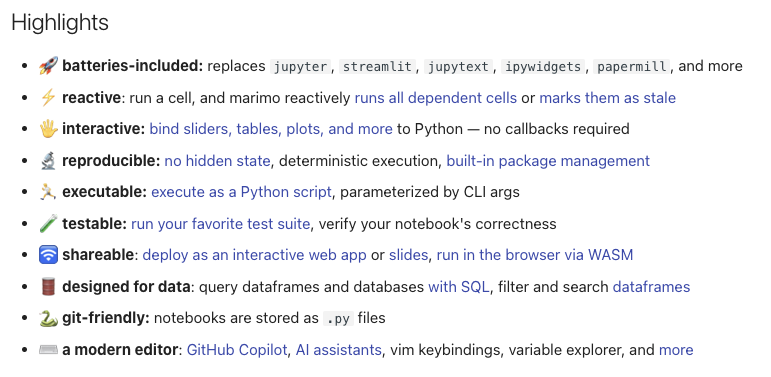
I vastly prefer writing and working with R to Python, but marimo is a really interesting tool and addresses the thing I’ve always disliked most about jupyter notebooks – the awful json file format that stores state in the document itself. Its browser-based editor feels pretty nimble and modern, too. I’ll explore it some more.